EPDS Telangana
Check your ration card status, perform FSC search, download your ration card, and complete TS ration card eKYC on epds.telangana.gov.in.
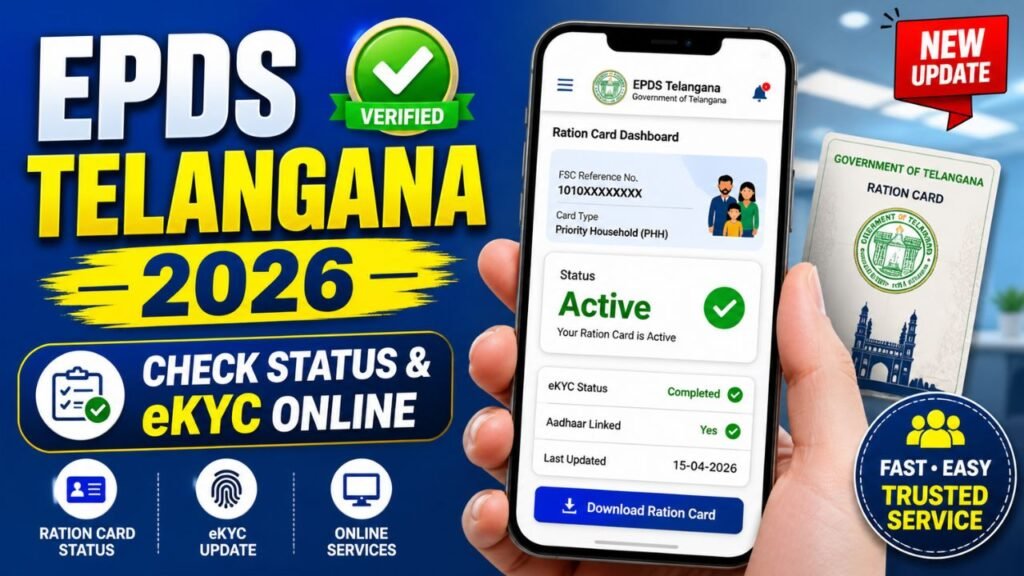
EPDS Telangana portal is a user-friendly online platform that helps citizens access all ration card services in one place. From checking your ration card status and performing an FSC search to downloading your Food Security Card and completing eKYC, everything can be done quickly online. This digital system ensures transparency, saves time, and makes it easier for eligible families to receive subsidized food benefits without hassle.
What is EPDS Telangana?
The Electronic Public Distribution System (EPDS) is a sophisticated digital initiative by the Civil Supplies Department, Government of Telangana. Its primary purpose is to streamline the distribution of essential commodities, such as rice, wheat, and kerosene, to eligible beneficiaries through a network of Fair Price Shops (FPS).
By moving from manual, paper-based records to a transparent, real-time digital database, the EPDS ensures that food subsidies reach the intended recipients directly, minimizing leakages, preventing fraud, and guaranteeing food security for the state’s most vulnerable populations.
Key Features of the EPDS Telangana Portal
The EPDS Telangana portal serves as a centralized hub for all food security-related services. Key features include:
- Online Ration Card Services: Apply for new cards, modify existing details, or request transfers without visiting a government office.
- Transparency: Citizens can view allotment details, stock availability at Fair Price Shops, and transaction histories.
- Real-time Status Tracking: Easily check the progress of your application or the status of your Food Security Card.
- Aadhaar Linking and eKYC: A secure mechanism to link your biometric identity with your ration card, ensuring that benefits are claimed by the rightful owner.
- Beneficiary Database Access: Authorized users can verify details and check entitlement lists directly on the portal.
EPDS Telangana Ration Card Types
Telangana classifies its beneficiaries into distinct categories to ensure resources are allocated where they are needed most. Understanding these categories is essential for applicants:
1. AAY (Antyodaya Anna Yojana): This is the most subsidized category, targeting the “poorest of the poor” families. These households receive a higher quantity of food grains at highly concessional rates.
2. PHH (Priority Household): These cards are issued to families that meet specific socio-economic criteria, ensuring they receive the necessary food security support.
3. Non-Priority Categories: These are general category households that may receive benefits based on government schemes and local eligibility criteria.
Eligibility Criteria: Eligibility is generally determined based on income levels, occupation, and existing socio-economic status as per government-defined parameters.
How to Check EPDS Telangana ration card status
Residents of Telangana can easily download their Food Security Card (FSC) from the EPDS Telangana portal without visiting any government office. This online process is quick, simple, and saves time. Follow the step-by-step instructions below to download or print your ration card
Step 1: Open your browser and go to the official EPDS Telangana website. This is the main platform where all ration card services are available.
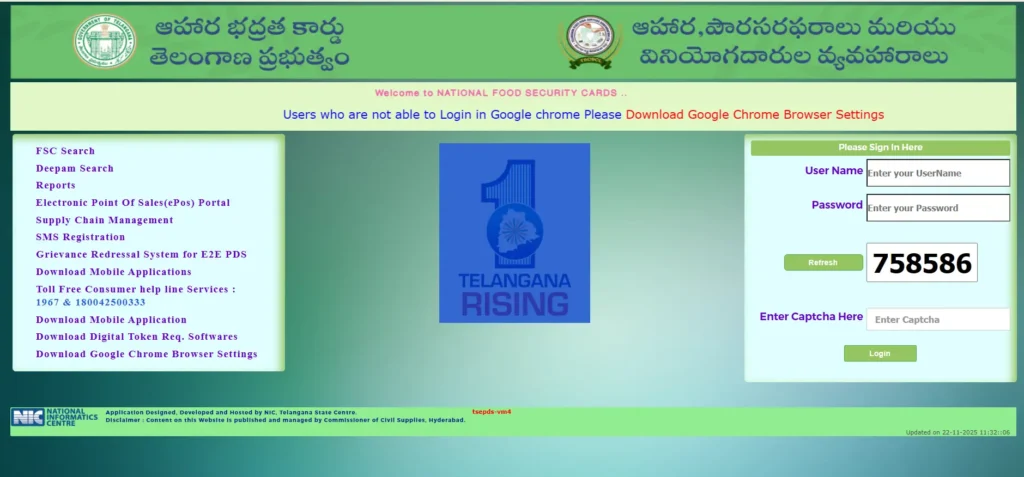
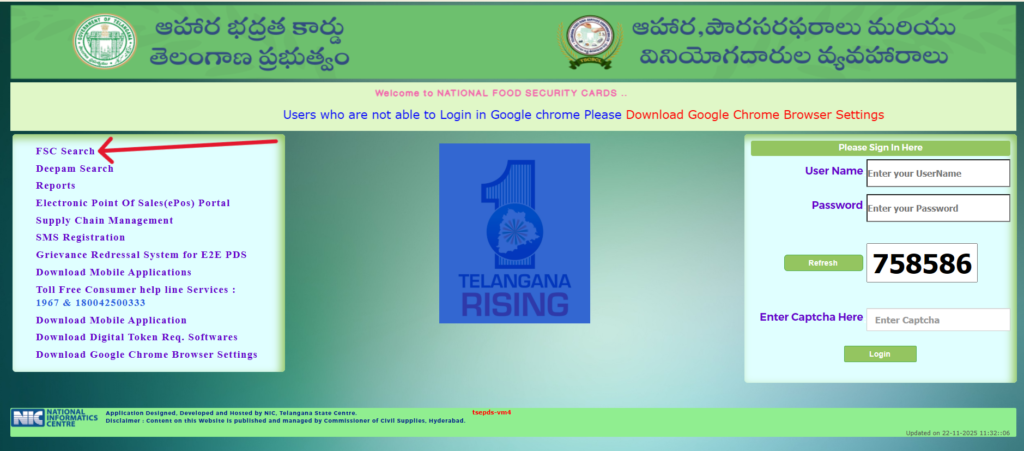
Step 2: On the homepage, look for the “Ration Card Related Services” section. Under this section, click on the “FSC Search” link to proceed.
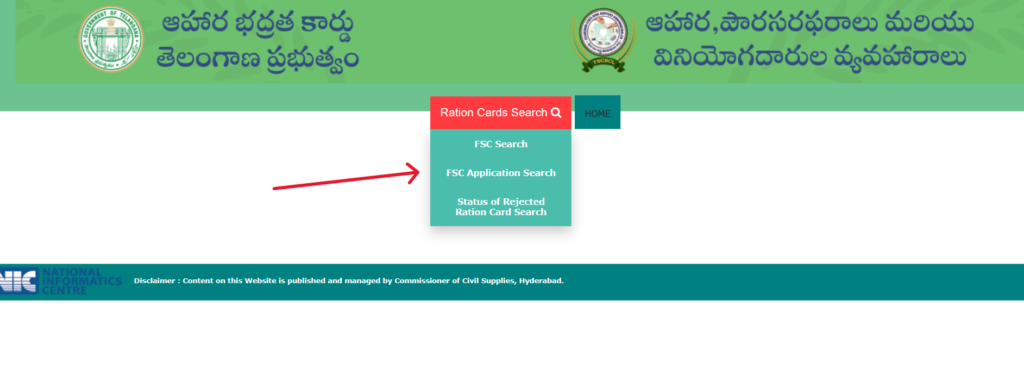
Step 3: Select the Type of Search: Choose the option based on your requirement. If your ration card is already issued, select FSC Search. If you are tracking a new application, select FSC Application Search.
Step 4: Enter Your Details: Enter details like FSC Reference Number, Old Ration Card Number, or Aadhaar Number.
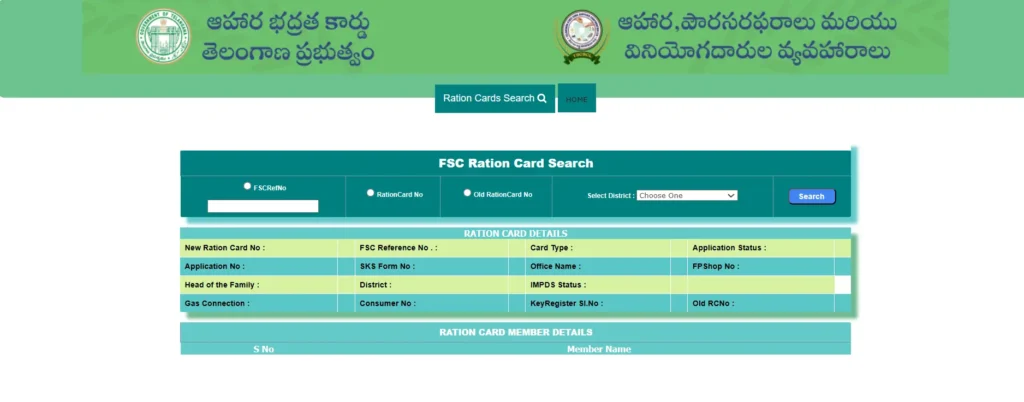
- After entering the correct information, click on the “Search” button to view your ration card details.
Step 4: View Results: The system will display your application’s current status (e.g., Pending, Approved, or Dispatched).
Important Tips
- Always enter correct details to avoid errors
- Ensure your Aadhaar is linked to your ration card
- Keep a digital copy saved for future use
- Visit MeeSeva centers if you face issues
EPDS Telangana eKYC Process
The Telangana ration card eKYC (Electronic Know Your Customer) is a mandatory procedure to ensure the authenticity of beneficiaries. This process links your biometric data with the database.
Steps to Complete eKYC:
- Visit the Center: Head to your nearest MeeSeva center or your designated Fair Price Shop (FPS).
- Carry Required Documents: Ensure you bring your original Aadhaar card for all family members associated with the ration card.
- Biometric Authentication: Place your finger on the biometric device as requested by the operator to verify your identity.
- Confirmation: Once the biometric authentication is successful, the eKYC data is updated in the central server. You should ask for a receipt or an acknowledgment as proof of completion.
How to Search Ration Card in EPDS Telangana
Need to verify your details or find a specific card? The portal offers robust search functionality:
- Search by FSC Number: If you have your Food Security Card number, this is the fastest way to retrieve information.
- Search by Aadhaar Number: The system allows searching via your unique government identification, which helps if you have misplaced your FSC number.
- Search by District/Name: If you are unable to locate your number, you can filter by district, mandal, and village to find your name in the beneficiary list.
EPDS Telangana Application Process for New Ration Card
Documents Required:
To apply for a new ration card, keep the following documents ready:
- Aadhaar Card: Of all family members.
- Address Proof: Utility bills (electricity or water), voter ID, or a rental agreement.
- Income Certificate: To verify your eligibility for specific card types.
- Passport-size Photos: Of the head of the family.
Application Steps:
- Visit MeeSeva: Go to your local MeeSeva center.
- Fill Application Form: Obtain and fill out the official Food Security Card application form.
- Submit Documents: Attach copies of the required documents listed above.
- Acknowledgment: Pay the nominal processing fee and collect your acknowledgment receipt, which contains the application number for future tracking.
EPDS Telangana Ration Card Download Process
Once your application is approved, you do not necessarily need to carry a physical copy everywhere. You can perform a Telangana ration card download online:
Quick Steps to Download Your FSC
- Go to Official Website: Visit epds.telangana.gov.in.
- Find Service: Look for “Ration Card Services” and click on FSC Search.
- Select Search Type: Choose FSC Search (if you have your number) or FSC Application Search (if you are tracking a new one).
- Enter Details: Input your FSC Reference Number, Old Ration Card Number, or Aadhaar Number.
- Download: Click Search. Once your details appear, click the Download/Print button to save the PDF.
💡 Pro Tip: If you cannot download your card, your eKYC is likely incomplete. Visit your nearest MeeSeva center or Fair Price Shop to update your biometrics.
Benefits of EPDS Telangana
The digital transformation of the Public Distribution System offers several advantages:
- Subsidized Commodities: Guaranteed access to rice and other essential items at significantly lower prices.
- Financial Security: It acts as a safety net for low-income families, reducing their monthly expenditure on food.
- Efficiency: The digital system reduces the time taken for service delivery.
- Transparency: Real-time updates help prevent unfair practices at Fair Price Shops.
Common Issues & Solutions
Even with a robust system, users may encounter minor hurdles:
- eKYC Not Updated: If your status shows eKYC pending, visit your Fair Price Shop immediately to complete the biometric verification.
- Name Mismatch: If your name on the ration card does not match your Aadhaar, submit a correction request via the MeeSeva portal.
- Aadhaar Linking Problems: Ensure that your mobile number is linked to your Aadhaar for OTP-based verification.
- Status Showing Pending: This is common during peak processing times. Wait for the standard processing period (usually 15–30 days) before raising a grievance.
Helpline Details
If you face persistent issues, you can reach out to the Civil Supplies Department:
- Customer Care Number: You can typically reach the helpline by dialing 1967 (Toll-Free).
- Support Centers: Visit your local District Civil Supplies Office or any MeeSeva center for on-ground assistance.
- Working Hours: Generally 10:00 AM to 5:00 PM on working days.
FAQs
Q1: What is EPDS Telangana?
It is the Electronic Public Distribution System that digitizes the process of providing subsidized food and essential commodities to eligible citizens in Telangana.
Q2: How to check ration card status in Telangana?
Visit the official EPDS Telangana website, go to the “Ration Card Status” section, and enter your FSC reference number or Aadhaar number.
Q3: Is Aadhaar mandatory for EPDS Telangana?
Yes, Aadhaar is mandatory for eKYC and for linking with your Food Security Card to ensure the correct distribution of benefits.
Q4: How to update eKYC for ration card?
You must visit a nearby MeeSeva center or Fair Price Shop to perform biometric authentication.
Q5: Can I download my ration card online?
Yes, once your card is approved, you can download a digital copy from the EPDS portal using your credentials.
Conclusion
The EPDS Telangana portal has made food security services more accessible, transparent, and efficient than ever before. By leveraging digital tools like the FSC search Telangana and online status tracking, citizens can manage their benefits without the need for multiple office visits. Keeping your Telangana ration card eKYC updated is the best way to ensure uninterrupted access to your entitled benefits. We encourage all beneficiaries to utilize these online services to stay informed and secure.
Disclaimer: This guide is for informational purposes only. Please refer to the official Civil Supplies Department of Telangana website for the most accurate and up-to-date procedures.
Check your Encumbrance Certificate (EC) online easily through the https://igrstelangana.org.in/. This service helps you verify property ownership history, transactions, and legal status before buying or selling any property. By using the EC search option, you can quickly access accurate land records, ensuring transparency and avoiding legal issues.